
Punx.social - The starting point for Punx into the Fediverse
tl;dr - Quick selection
- punk.photos – if you are more an Instagram user and only want to post and read posts with images.
- punkstodon.de – if you are more a Twitter/Threads user and also want to see and write posts without images.
- punktube.net – if you are more a YouTube user and only want to post videos. To watch the videos you don't need an account. If you just want to comment or rate a video, an account on a Mastodon instance is enough. A punktube account is only required for uploading videos.
- If the band's website is already based on Wordpress, just take a look at the ActivityPub PlugIn. That might be enough for you.
Are you completely lost already? In that case, it might be best to take a closer look at all the content on this page.
What is the Fediverse?
The Fediverse, the Federated Universe, is a network of different free social media services (e.g., Mastodon, Pixelfed, PeerTube, Friendica, and many more...).
The services are DIY alternatives to the big, well-known "social" media platforms.
However, they are not run by (right-wing) tech-bro billionaires, but by (more or less) ordinary people like you or me.
The platforms are run entirely without any commercial interests, and there is no algorithm that tries to manipulate people.
Especially in the DIY-loving punk scene, this is the same approach as always: Do it yourself, instead of eating the shit you got served!
A small overview of how the Fediverse works can be found, for example, here
A very good, self-explaining video, by Elena Rossini can be watched here:
Mastodon, Pixelfed, PeerTube, Wordpress or Gancio - what should I choose?
The most crucial question at the beginning is always: Where should I go? Not only do you have to choose an instance, more on that below, first you have to consider which "software" you want.
The three largest and most well-known are Mastodon (~8 million accounts), Pixelfed (~1 million accounts) and PeerTube (500k accounts).
But don't choose by the numbers alone. Much more important is: What exactly do you want to do in the Fediverse?
If you are a label and want an account to upload music videos, PeerTube, an open alternative to YouTube, is a very good choice.
If you are a festival, a band or a label and actually just want to post your own pictures and videos, Pixelfed is a good solution for you. It is oriented towards Instagram, so you won't see text-only posts from the Fediverse. There are stories like on Instagram, but this feature is not really mature yet.
If you definitely want to read what is being written in the Fediverse, and you don't care whether you see texts, images or videos, or if you only want to post texts, then Mastodon, the dominant player in the Fediverse, is your choice. If you are already familiar with Twitter / Threads, Mastodon will be really familiar for you.
If you have a website based on Wordpress with your band, label, fanzine or concert group, there is a very simple way for you to bring the page into the Fediverse:
You just have to install the ActivityPub PlugIn and every post you publish on the Wordpress site will also go into the Fediverse. And if you set it up correctly, your Website will have your own domain as a Fediverse handle.
If you only want to publish concerts, you should check out Gancio and Mobilizon.
These are online concert calendars that push every new concert into the Fediverse, examples of how it looks can be found here.
With Gancio you don't even need an account, this can be done anonymously, but then you can't edit the event anymore, for this you need an account.
What else is there in the Fediverse?
There is much more than the software mentioned above. However, there are currently no punk-instances here, but as soon as they exist, we will present them separately:
- Loops – TikTok alternative, is relatively new and still in beta. The software is also from the Pixelfed creator
- Friendica - really similar to Facebook
- Bandwagon – Similar to Bandcamp
- Funkwhale – Music streaming
- Lemmy – Discussions like on Reddit
- BookWyrm – everything about books, similar to GoodReads
A complete list of all Fediverse software can be found on FediDB.com.
Which instance should I choose?
If you have chose your software, the next difficult step is just around the corner: Which instance should I go to?
I usually always recommend: Go to the FediDB server page and search for Punk there. You will find some interesting instances.
If you are on a large instance like Mastodon.social, where there are 3.3 million registered accounts, about 300k are active users, your posts will disappear very quickly in the local timeline. On smaller instances like our Punkstodon.de or Punk.photos, this will not happen so quickly.
To make your search a little easier, we have curated a list of the (for us) important instances.
Our instances - from us for you (and ourselves)
- punk.photos - Pixelfed instance, photo community like Instagram
- punktube.net - PeerTube instance, video platform like YouTube
- punkstodon.de - Mastodon instance, microblogging service like Threads / Twitter
Other recommended instances:
- Metalhead.club – Mastodon for the Metalheads, including their own anthem and beer!
- Kolektiva.social – Mastodon Anarchists server
- 438punk.house – Mastodon Montreal Punk instance
- counterforce.social – Mastodon, Home of the Fediverse Punk Month
- desposseits.com – Mastodon, Barcelona-based instance (ES/CAT/EN)
- autonomous.zone – Mastodon, server for European Anarchists
- radikal.social – Mastodon, activist instance from Denmark
How do I get reach?
Be active in the Fediverse
If you create a completely new account, introduce yourself briefly. Just a short post with a photo. In general: Posts without photos are not federated to Pixelfed (only a real photo counts here, no link previews). Very important, use the hashtag #newhere.
In general: Since there is no algorithm that shows users old posts from the past, you have to be active in the Fediverse yourself. Only then you will appear in people's timelines, they can repost you and you will appear again with their followers.
Normally, people who have interacted with you online will follow you as well. Many people also follow back when they notice that you have similar interests and something interesting to share.
Hashtags
Similar to Twitter or Instagram, hashtags are the way to gain the most reach. People can follow hashtags, and there are special bots that monitor certain hashtags and automatically share content.
We have set up a hashtag bot for you. It now reposts every post that contains #punk or #punkrock. If you want to follow it, look for @punk@tagpush.app.
If you are doing concerts, use #konzert, #konzerte, #concert, #concerts or similar.
If you release a new record and post about it, use the hashtag #vinyl. There is also a bot that reposts every post with it.
Fedi.Punk.Guide
There is the beautiful site @FediPunkGuide@mastodon.social. This is a site where all bands, fanzines, label, event guides, festivals, etc. can register. It is basically an index for everything that is punk-relevant.
So go to the Fedi.Punk.Guide registration page and simply register.
After a few days, you will be accepted. The accounts are checked by a real person, so be patient.
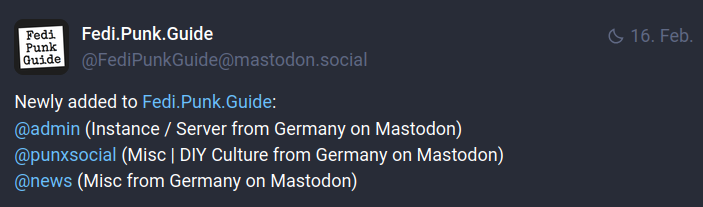
If you are accepted, @FediPunkGuide@mastodon.social will post an update to all recipients, it looks like this:
Use the instance that is best for you
As mentioned above, you can already see how to choose the right instance:
Think about where are (maybe) the people you want to reach?
If you are a metal band, it probably makes more sense to join Metalhead.club, rather than Punkstodon.de.
On the main instance Mastodon.social, of course, there are the most users, but does that make sense for you? If your music is in German, how much does it interest an investment banker in Down-Under or a CEO in South America? If you make punk music, look for a punk instance, at least there is an audience that could theoretically like your music.
But if you are a songwriter who only wants to play in Berlin, or a Berlin club, Berlin.social may be the better choice.
But if you later find out that it was not the right choice, you can switch at any time, see here.
Bots
There are all the bots from Fedigroups.social.
If you mention the account @punk@fedigroups.social in your post, your post will be automatically reposted by the bot. You can check out what other bots are available and see if they fit your post.
All accounts following this bot will then see the post in their timeline.
Add gigs
Sign up for all the concert accounts. On Gancio instances, like berlin.askapunk.de, you can enter your gigs without an account, which will then be approved by the admins. But you will no longer have the ability to edit.
But if you create an account, the entered posts go online immediately, and you can edit them at any time. The concerts are then not only online on the website, like berlin.askapunk.de, but are also pushed to all followers of the Fediverse account @relay@berlin.askapunk.de in the timeline.
Additionally, the gigs are then sent to a Telegram group with over 400 people.
DIY - build your own timeline
If you just created a new Mastodon or Pixelfed account, the timeline is in the beginning empty or boring. There is the local timeline, where you can see everything that people on your server post. If you are on a very small instance, not much happens there.
That doesn't mean you shouldn't be on a small instance. Find an instance that fits you (see instance selection), but build yourself an interesting timeline.
Hashtags & Punk Group
The easiest way to get interesting content into your timeline is to follow hashtags and follow repost accounts.
For people interested in punk, the following hashtags are recommended: #punk, if you are looking for records, #vinyl, for concerts there is #konzerte or #concerts, etc. Sooner or later, you will find posts with interesting hashtags.
There is also the @punk@fedigroups.social bot, which reposts all posts in which the bot is mentioned. So if you follow this account, you will get even more punk-related content in your timeline.
On Mastodon
Just click the #punk hashtag, then Browse posts in #Punk
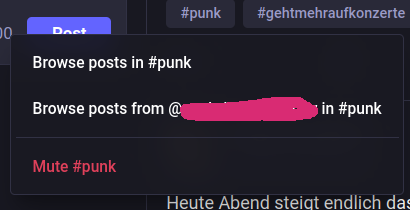
Then you will see all posts that are known on your server under the hashtag (here: #punk).
As you can see, you can simply click the Follow Hashtag button.
On Punkstodon.de, you can see under the URL https://punkstodon.de/followed_tags all the hashtags you follow. (on Mastodon.social)
On Pixelfed
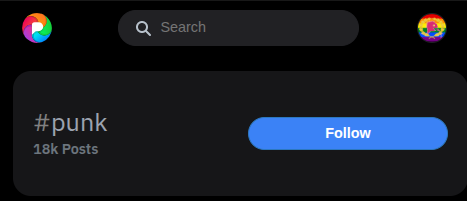
On Pixelfed, it's easier: Just click on a hashtag, e.g., #punk.
On the following page, simply click the Follow button, and you'll be following the hashtag.
Repost Accounts
There are accounts that do nothing but repost other posts and accounts.
On Punkstodon.de, for example, there is the Bandbot account.
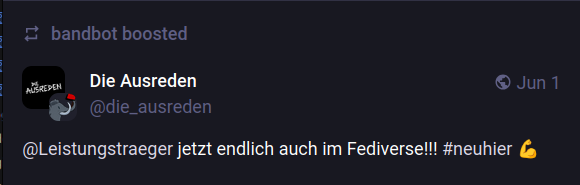
This is a bot curated by the Punkstodon admins. The bot follows many punk bands, and as soon as they make a post, it is reposted by the Bandbot. It looks like this:
So if you want to discover new bands regularly, just follow the Bandbot.
There are also bots that simply repost certain hashtags. It may sound similar to following a hashtag directly, but when you follow a hashtag, you only see the servers that your server knows.
But the bots know the servers and see many more posts and then repost them.
So look for the bots and follow them: @punk@tagpush.app for punk, for vinyl fans there is @vinyl@tagpush.app.
In addition, there’s a bot for almost every conceivable hashtag on tags.pub. To find them, simply search for the hashtag using @euer_Suchbegriff@tags.pub, for example, @punxsocial@tags.pub, and you’ll usually find it. You’ll find the most absurd hashtags there. This is because some servers, like Punkstodon.de, have integrated this feature. As soon as you use a hashtag on Punkstodon.de, a bot is automatically created for it.
There is no real algorithm, but there is a trending section on every Mastodon server. There you can see what posts, hashtags, people, or news are currently trending.

There is also the Trending Bot, which reposts everything that is trending from the 10 largest Mastodon servers. If you follow this bot, you will get an idea of what is currently happening in the Fediverse.
Follow concert accounts
There are many accounts that do nothing but post concerts. Just follow them to get concerts in your timeline.
- Berlin concerts: berlin.askapunk.de
For updates follow:@relay@berlin.askapunk.de - Rhineland (NRW) concerts: rhine.askapunk.de
For updates follow:@relay@rhine.askapunk.de - Rhein-Main: events.rheinmain.social
For updates follow:@events@events.rheinmain.social - Potsdam concerts:rotes.potsda.mn
Here you have to follow each club individually, search forrotes.potsda.mn - Automatic reposts in the Fediverse from Telegram groups: punkstodon.de/@punk_konzerte
- On Steelfeed.de you can see a lot of concerts, more metal than punk but actually both.
For each city/region you then have the option to follow a bot, e.g. for Berlin you simply follow@berlin@steelfeed.de.
As always: Go to the Fedi.Punk.Guide and you'll find many more event guides to follow.
Fedi.Punk.Guide
There is the wonderful site Fedi.Punk.Guide. This is a site where all bands, fanzines, label, event guides, festivals, etc. can register. It is basically an index for everything that is punk-relevant.
On the FAQ page of the Fedi.Punk.Guide, you can read how to import users on Mastodon, Pixelfed, or Friendica.
So if you export all the bands from the Fedi.Punk.Guide and then import them, you will get all posts from the imported bands in your timeline.
Starter-Packs
Since Mastodon 4.6, there are Starter Packs. This allows people to curate a list of interesting accounts. We also have a Starter Pack with Punx.social content, a so-called Collection, which is this one.
You can check out the recommended accounts there and follow them individually.
The people from Metalhead.club have created a Starter Pack on fedidevs.com, with all the bands on their instance, which you can follow with a single click.
Verify Mastodon Account
If you want to verify, that your Mastodon account is really your account and not a fake, you can do this relatively easily.
Go to Settings → Public Profile → Verification (Direct link: Punkstodon.de / Mastodon.social).
Here it is explained again what you need to do:
You need to embed a link to your Mastodon account on your homepage, e.g., your band's website, here using the example of punx.social and the @punxsocial@punkstodon.de Fediverse Account.
<a rel="me" href="https://punkstodon.de/@punxsocial">Punkstodon</a>
Then it will look like this:

More information can be found on the official Mastodon website.
Recommended apps:
Official apps are not always the best – this list is subjectively ordered
We also do not list apps that are not open source.
Of course, everything works in the browser, often even much better!
Pixelfed:
- Pixelix: [F-DROID] [Google Play] [App Store]
- Pixeldroid: [F-DROID]
- Pixelfed (official app): [Google Play] [App Store]
- Impressia: [App Store]
Mastodon:
- Fedilab: [F-DROID]
(can also do Pixelfed and PeerTube, but not as well) - Tusky: [F-DROID] [Google Play]
- Mastodon (official app): [F-DROID] [Google Play] [App Store]
- Ice Cubes App: [App Store]
PeerTube:
- PeerTube (official app): [F-DROID] [Google Play] [App Store]
Collection of links:
- Fedi.Punk.Guide over 300 accounts from punk & hardcore.
For updates follow: @FediPunkGuide@mastodon.social
More punk infos about the Fediverse (to be continued):
FAQ
- How can I easily like a PeerTube video with my Mastodon account? Our El Minuto has published a video on PunkTube for this
- How can I switch from a Mastodon server to punkstodon.de (or another server)? How to do this is explained both here and here very well.
- What is the difference between the normal timeline, the local timeline and the global timeline?
You can see the timelines on all instances, whether it's Pixelfed or Mastodon, etc.
On the normal timeline, you see every post from accounts you follow.
On the local timeline, you see everything that other accounts on your instance are posting, for example, everything happening onpunk.photosorpunkstodon.de.
The global timeline shows all posts from accounts that are shown by other users of your instance. So, for example, onpunkstodon.dein the global timeline, you see posts from other users followed by otherpunkstodon.deusers. -
What are these alt texts?
When you post images, please pay attention to alt texts.
The Fediverse strives to be inclusive. There are many users in the Fediverse who rely on screen readers.
If you post images without alt text, screen readers have no possibility to tell users what is on the image. This is the opposite of accessibility.
So be part of the positive change and use alt texts!
Thank you! - How can I help you? Write us in the Fediverse via @punxsocial@punkstodon.de, or even better: make an Issue (Ticket) or a Pull Request on Codeberg.
Bridge to Bluesky / ATproto
Bluesky
After all, there's not just the Fediverse, but also Bluesky. Many bands have chosen the Fediverse, but many have also chosen Bluesky.
We ourselves have all consciously chosen the Fediverse, as it is simply more decentralized than Bluesky. However, some of us still have accounts on Bluesky to see what's happening "over there".
Bluesky is more or less completely US-based, but slowly there are also non-US servers that use the ATproto protocol, such as Eurosky, but the whole thing is simply very strongly shaped by the US company. And thanks to the US-Cloud Act, US authorities can also access Bsky at any time. As I said, everything can still change, but due to the really lacking decentralization so far, too much still runs through the US server. There is also W.Social, which is based on Bluesky, but (hopefully) is doomed to fail because users are required to identify themselves with their ID.
In addition, Bluesky was financed with a lot of venture capital, so it's only a matter of time before they want their money back. This usually succeeds with advertising. Let's hope it doesn't come to that, but if it does, you know where you read it first!
On Bluesky, there are now also the ICE, FBI, JD Vance, etc., and there is less moderation. Accordingly, there are already many MAGA people there. It is still quite a hopeless swamp like Twitter / X, but in any case, it is slowly going in the same direction.
But not everything is bad about Bluesky, it remains exciting to see how all this develops.
What is a Bridge
If you have just decided to join the Fediverse (or Bluesky), but you don't have any additional capacity to also play the respective other medium, there is help here. The Fedi Bridge allows you to synchronize content between the two platforms.
Due to the character limit, the text is truncated and linked to the respective platform. An example of how a Fediverse post looks in Bluesky can be seen here.
Here is an example of a Bluesky account, using Team Scheisse as an example, as it looks bridged in the Fediverse.
Important: Before you only play Bluesky or Fediverse, play the missing one with the Fedi Bridge to reach the people there as well.
Setup:
You go to the Fedi Bridge and log in.
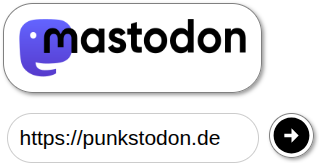
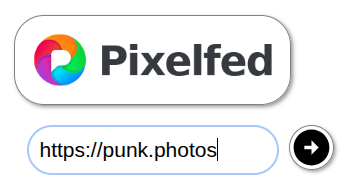
You enter your own instance for Mastodon, here e.g. punkstodon.de and for Pixelfed your own instance, here e.g. punk.photos.
Then you toggle the switch for bridging.

That's enough, and your account is available on Bluesky under FediverseUsername.FediverseDomain.tld.ap.brid.gy.
If you now post something on Mastodon, it will be automatically copied to Bluesky. Anything longer than 300 characters will be truncated and replaced with a link to the original post.
Use & Verify Your Own Domain:
Your Bluesky bio is copied 1:1 from Mastodon upon creation.

If you want to change this, there is a way: You change your image on Mastodon / Pixelfed and then click on the Profile reload Button
From then on, the new profile information will be displayed on your Bluesky profile.
Use & Verify Your Own Domain:
If you have bridged your account from the Fediverse to Bluesky, you have probably noticed that the username FediverseUsername.FediverseDomain.tld.ap.brid.gy is quite ugly.
If you have your own domain (most bands & labels will have this), you have the option to appear on Bluesky under the handle @MyDomain.tld instead of your long FediverseUsername.FediverseDomain.tld.ap.brid.gy.
You need to copy your Decentralized Identifiers (DID) from the Fed.Brid.gy page. How to do this is shown in the screenshot

Now enter your domain at "Set Bluesky Handle", here in the example it is the punx.social page.
Then submit it, and you should see a similar error message.

Now you need to enter the data in your DNS or HTTP. An example of how it looks can be seen here, otherwise get more information from the links above.
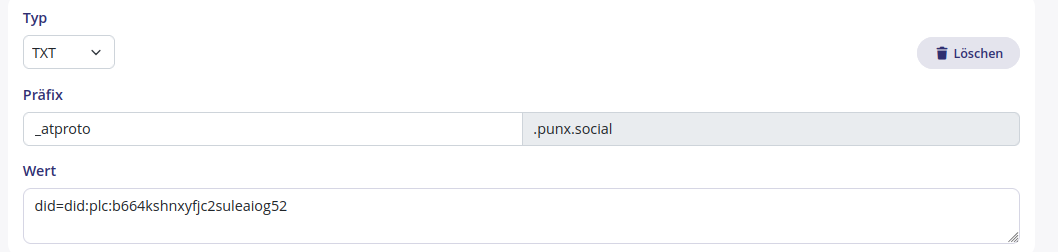
After that, you can be reached on Bluesky under your own domain, which is also indirectly a verification.
Support us
Digital
If you want to support us and our work, you can do it easily:
Tell about the Fediverse on Instagram, Facebook, TikTok, Twitter, LinkedIn (LOL), and wherever else you are.
Share the website punx.social. However, it may happen that the big tech companies limit the reach of these posts. Exactly one reason why you want and should be in the Fediverse.
Stickers
If you are a band on tour, or organize concerts and festivals, or are a label / mailorder, get in touch with us. We are happy if you distribute our stickers at your concerts, include the stickers with orders, etc.
Thank you!
Workshops
If we should hold a Fediverse workshop at your bar, club, etc. in Berlin or the Rhineland/Ruhr area, get in touch.
If you want to hold a workshop yourself, even better. We can provide you with a special website and invite codes for Punkstodon.de and Punk.photos, get in touch.
Money
You have a few euros left and want to support us financially? That's great, but:
The costs for the servers are manageable, we can and want to handle that ourselves for now. If that ever changes, we will let you know.
But those who urgently need the money are the local organizers and clubs of small concerts and bands on tour. We all enjoy going to small underground concerts and are glad if the opportunity still exists for as long as possible.
Otherwise, there are still many good NGOs that need the money more than we do. So give the money to them.
Thank you!
Are you missing something?
Write to us on the Fediverse @punxsocial@punkstodon.de
Or, if you are technically inclined, make a pull request directly on Codeberg